Free
Support
Kurzinfo: Navilock NL-3331 M8 Serial Multi GNSS Receiver - GPS-/GLONASS-/GALILEO-Empfängermodul Gruppe GPS-Kits Hersteller NAVILOCK Hersteller Art. Nr. 60326 EAN/UPC 4043619603268 Produktbeschreibung: Navilock NL-3331 M8 Serial Multi GNSS Receiver - GPS-/GLONASS-/GALILEO-Empfängermodul Produkttyp GPS-/GLONASS-/GALILEO-Empfängermodul Receiver MTK MT3333 - 33 Kanäle Schnittstelle NMEA 0183v3.01 Aktualisierungsrate 10/Sekunde Antenne Eingebaut Abmessungen (Breite x Tiefe x Höhe) 6.2 cm x 6.2 cm x 2.1 cm Ausführliche Details Allgemein Produkttyp GPS-/GLONASS-/GALILEO-Empfängermodul Receiver MTK MT3333 - 33 Kanäle Schnittstelle NMEA 0183v3.01 Genauigkeit Position - 2 m Aktualisierungsrate 10/Sekunde Verfolgungsempfindlichkeit -165 dBm Antenne Eingebaut Abrufzeiten Schnellstart 1sec Kaltstart 34 Sek. PC-Systemanforderungen für GPS Erforderliches Betriebssystem Microsoft Windows 7, Windows 8.1, Linux Kernel 2.6, Windows 10 Verbindungen Schnittstellen Seriell Abmessungen und Gewicht Breite 6.2
Herbert Richter Selbstklebende Brillenablage (186)
Kurzinfo: Brodit ProClip Angled mount - Halterung - Schwarz Gruppe Zubehör Hersteller Brodit Hersteller Art. Nr. 855271 Modell ProClip Angled mount EAN/UPC 7320288552712 Produktbeschreibung: Brodit ProClip Angled mount - Halterung Produkttyp Halterung Vorgesehen für Handy Geeignet für Installation Auto Produktmaterial ABS-Kunststoff Ausführliche Details Allgemein Produkttyp Halterung Vorgesehen für Handy Geeignet für Installation Auto Produktmaterial ABS-Kunststoff Farbe Schwarz Verschiedenes Kompatible Fahrzeuge Buick Encore / 2017 (für USA) Opel Mokka X / 2017 (für Europa) Platzierung/Befestigung Armaturenbrett
Beschreibung Motorrad-Alarm Schaltet automatisch eine Hupe oder Sirene ein, wenn das Motorrad aus der Parkstellung in eine andere Stellung bewegt wird. Wasserdicht und stoßfest vergossenes Modul. Auch zur Absicherung anderer Objekte geeignet, wenn diese nicht bewegt werden dürfen. Technische Daten: Ausführung: Baustein Betriebsspannung: Max. 25 V/DC Produktabmessung, Breite: 25 mm Produktabmessung, Höhe: 15 mm Produktabmessung, Länge: 30 mm Stromaufnahme: Max. 1 A Weitere technische Daten: Schalt-Neigungswinkel: ca. 12 bis 50,80cm (20"") alle Richtungen
Kurzinfo: Innergie PowerJoy Go - Netzteil - Pkw - 10 Watt - 2.1 A (USB) Gruppe Netzgeräte & Batterien/Akkus Hersteller Innergie Hersteller Art. Nr. ADC-10BB AR Modell PowerJoy Go EAN/UPC 8858751701897 Produktbeschreibung: Innergie PowerJoy Go - Netzteil - Pkw Produkttyp Netzteil - Pkw Abmessungen (Breite x Tiefe x Höhe) 2.38 cm x 6 cm x 2.16 cm Gewicht 16.8 g Ausgangsanschlusstyp USB Erforderliche Netzspannung 12 V Geleistete Netzspannung DC 5 V Ausführliche Details Allgemein Produkttyp Netzteil - Pkw Breite 2.38 cm Tiefe 6 cm Höhe 2.16 cm Gewicht 16.8 g Stromversorgungsgerät Erforderliche Netzspannung 12 V Eingangsanschlüsse Pkw-Zigarettenanzünder Eingangsstecker Menge 1 Geleistete Netzspannung DC 5 V Ausgabeanschlussstellen 4-polig USB Typ A Gestellte Leistung 10 Watt Elektrischer Strom max. 2.1 A Merkmale Kurzschlussschutz, Überspannungsschutz, Überstromschutz, Over Power Protection (OPP), InnerShield Power Protection, GreenSenseTechnologie
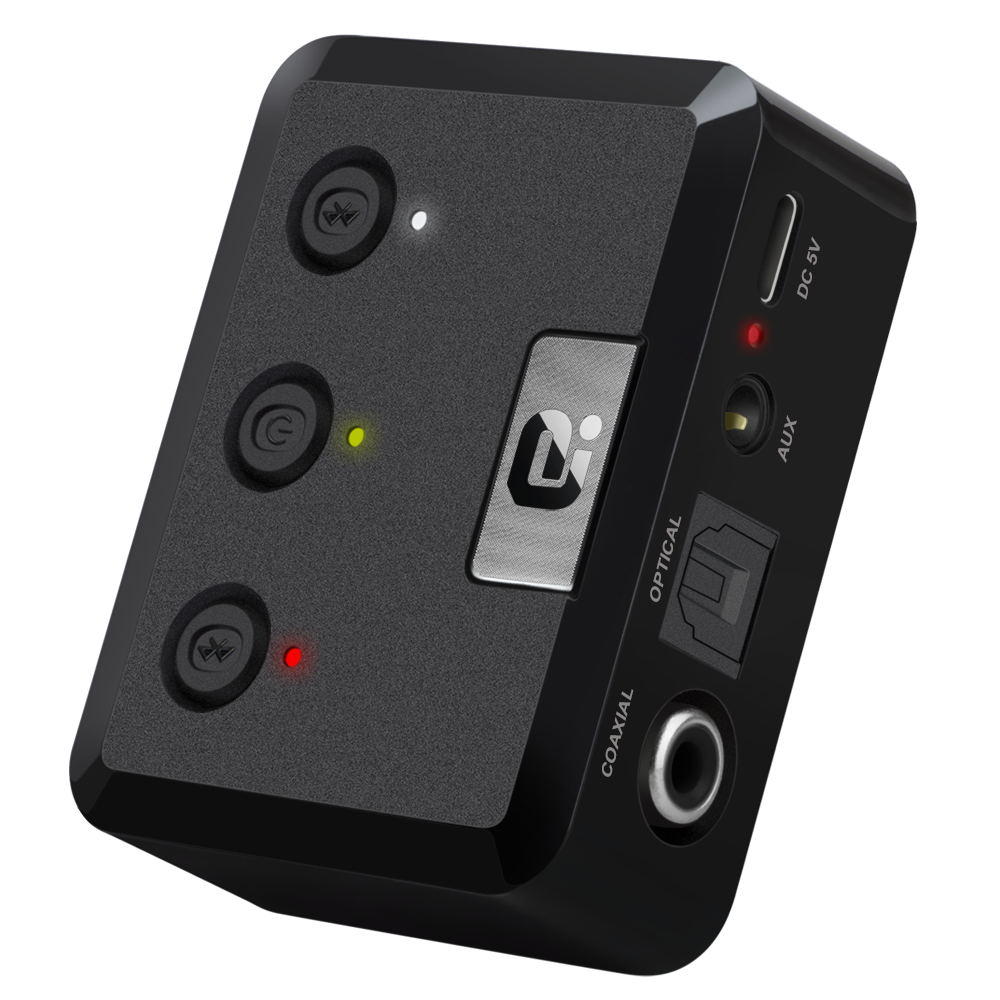
Operation Specifications:1. Press and hold the power button for 1S to turn on the machine. At this time, the white indicator of the device 1status and the white status indicator of the device 2 are on, and the middle power indicator is lit yellow.2. At this time, put the bluetooth device (bluetooth speaker or earphone) into the bluetooth pairing state, and thenpress the right button of MR275 right. At this time, the blue indicator of the device 2 status flashes quickly and entersthe search pairing state. After the pairing is successful, the device 2 is blue. The status indicator will be steady on.3. If you need to connect a buetooth device (bluetooth speaker or earphone), enter another bluetooth device (bluetoothspeaker or earphone) into the bluetooth pairing state, and then press the MR275 left pairing button. At this time, the device1 status blue indicator light is fast. Flash, enter the active search pairing state, after the pairing is successful, the blue statusindicator of the device 1 will be always on.4. Press and hold the right pairing button for 5 seconds to enter the bluetooth clearing list (that is, all previously connectedbluetooth device lists will be deleted).5. Automatic connection status:When the bluetooth device and the MR275 are successfully paired, when the bluetooth device is turned on again, it willautomatically connect back to the MR275;When the bluetooth device is turned on and waiting for the connection state, the MR275 is turned on at this time, and t