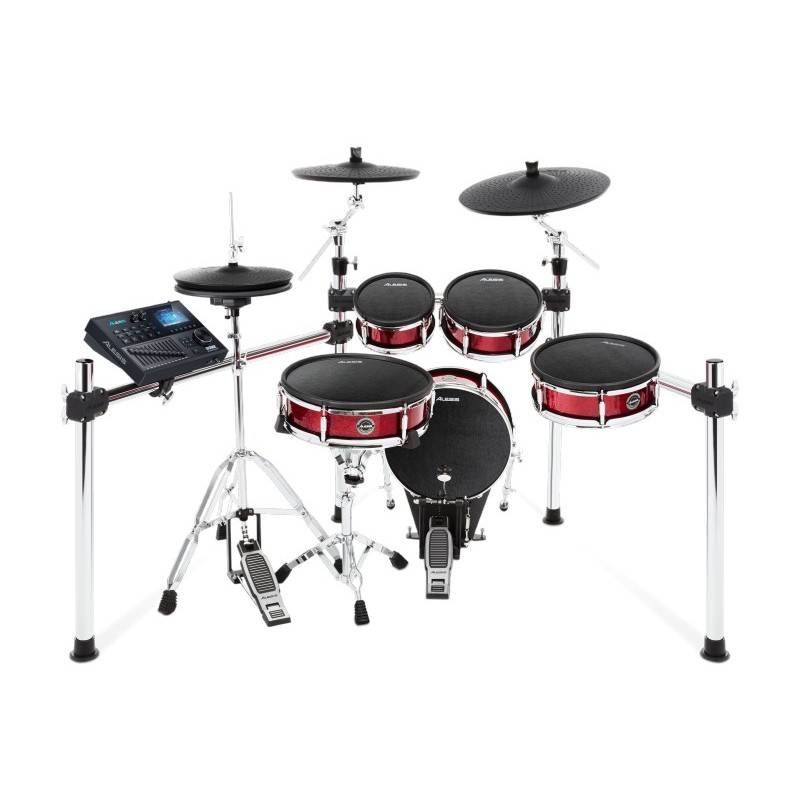
Traditionelle Drumgrößen und Acoustic Feeling Das Alesis Strike Kit zerstört all Ihre Vorurteile über elektronische Drums. Es kombiniert das Gefühl und die Vertrautheit eines akustischen Schlagzeugs mit der Vielseitigkeit und den Möglichkeiten der besten E-Drums. Dies ist das perfekte Schlagzeug, um über die Limitierungen eines akustischen Sets hinauszuwachsen, ohne dafür etwas aufzugeben. Die patentierten (U.S. Patent 9,424,827) Doppelzonen Mesh-Shellpads mit Sensitivitätsjustierung kommen mit hochwertigem Holzgehäuse in den Akustik-Standardgrößen (14\" Snare, 8\", 10\" und 12\" Toms, 14\" Kick) für ein vertrautes Spielgefühl. Der neue Standard elektronischer Cymbals Strike Cymbals sind ein aufregender Schritt nach vorne. Sie fühlen sich außergewöhnlich realistisch an, sind eine perfekte Mischung aus Spielgefühl, Kontrolle und Bounce. Die großen Oberflächen der Becken (12\" Hi-Hat, 14\" Crash mit Choke und 16\" 3-Zonen Ride) kommen in einem stylischen \"Hammered Look\" daher. Individuelle Sounds dank Strike Performance Modul Das Strike Performance Drum Modul kommt mit einer Soundlibrary von 100 Drum Kits, welche aus über 1.600 Multi-Sample Instrumenten besteht. Das Modul liefert eingebautes Sampling, SD Karten Speicher und USB/MIDI Verbindung, zur Benutzung mit der Musikproduktions-Software Ihrer Wahl sowie für den neuen leistungsfähigen Strike Software Editor. Ein eingebautes 4,3\" Farbdisplay zeigt all Ihre Einstellungen im direkten Überblick. Technische Daten Strike Performance Drum Modul mit 4,3 Vollfarbdisplay und individuellen Ausgängen Neue Sounds mit 100 Kits und über 1.600 Multi-Sample Instrumenten Inklusive 8 GB SD Karte für User Kits und theoretisch unlimitiertem Speicher für eigene Kits und Instrumente Komfortabler 12-Kanal Mixer zur Abstimmung der Lautstärkepegel Große Doppelzonen Pads mit Holzshells und einstellbaren Mesh Fellen 14\" Bassdrum, 14\" Snare Pads und drei Tom Pads (8\", 10\" und 12\") Dreiteiliges Cymbal-Set mit 16\" 3-Zonen Ride Cymbal, 14\" Crash Cymbal und 12\" Hi-Hat Stabiles, hochwertiges Chrom Rack Software Editor zur Erstellung eigener Kits & Instrumente WAV-Samples und Tracks zur Begleitung können über Software geladen werden Integrierter Sampler USB/MIDI Ausgang für Verwendung mit virtuellen Instrumenten und Aufnahme-Software ? Lieferumfang Strike Performance Drum Module 14\" Bassdrum 14\" Dual-Zone Snare Pad 8\" Dual-Zone Tom Pad 10\" Dual-Zone Tom Pad 12\" Dual-Zone Tom Pad 16\" Triple-Zone Ride Becken 14\" Dual-Zone Crash Becken 12\" bewegliche Hi-Hat Becken vierbeiniges Chromrack mit Cymbal-Halterungen Doppelstrebiger Snare Ständer Verbindungskabel Montageschlüssel Drum Sticks Netzteil 8 GB SDHC Karte Montageanleitung, Bedienungsanleitung Sicherheits- und Garantiebestimmungen Strike Software Editor (Download) Hi-Hat Stand und Bassdrum Pedal sind nicht im Lieferumfang enthalten Drum Modul Bedienelemente: 4,4\" LED Display, Digitalmixer-Einheit mit 12 x 45 mm Fader, Ein-/Aus Schalter, Master Lautstärkeregler, Kopfhörer Lautstärkeregler, Aux Lautstärkeregler, 5 Menü Navigations-Taster, 1 Auswahl Endlosencoder, Transportkontrolle, 6 Funktionstasten, 11 weitere Taster Maximale Polyphonie: 64 Stimmen Drum Kits: 100 Kits Preset-Kits Instrumente: Über 1.600 (Drums, 14 Hi-Hat Kombinationen, Percussion, SFX), beliebig viele User Display: Hochauflösendes 4,4\" Vollfarb LED Display Eingänge: 13 x 6,3 mm Klinke Triggereingänge, 3,5 mm Klinke Stereo Aux-Eingang, 5-pin DIN MIDI Eingang, SD Kartenslot Ausgänge: 6,3 mm Klinke Stereo Kopfhörerausgang, 2x 6,3 mm Klinke Masterausgänge (Stereo, L/R), 8 x 6,3 mm Klinke Ausgänge, 5-pin DIN MIDI Ausgang, USB Anschluss SD Kartenslot: FAT32; für SD Karten bis SDHC Class 10 64 GB Stromversorgung: externes Netzteil 12 V DC / 2 A Maße Drum Modul: 305 x 203 x 76 mm Gewicht: 1,56 kg Weitere Spezifikationen Maße: 46 x 97 x 76 cm Gewicht: 46 kg inkl. Verpackung