Libre
Soutien
Kurzinfo: Hama Car Mains Adapter - Netzteil - Pkw Gruppe Netzgeräte & Batterien/Akkus Hersteller Hama Hersteller Art. Nr. 00046512 Modell Car Mains Adapter EAN/UPC 4007249465122 Produktbeschreibung: Hama Car Mains Adapter - Netzteil - Pkw Produkttyp Netzteil - Pkw Erforderliche Netzspannung 12 V Ausführliche Details Allgemein Produkttyp Netzteil - Pkw Stromversorgungsgerät Erforderliche Netzspannung 12 V
Autoradio JVC, KD-X152 USB MP3-Magnet mit AUX-Eingang und USB (KD-X152)
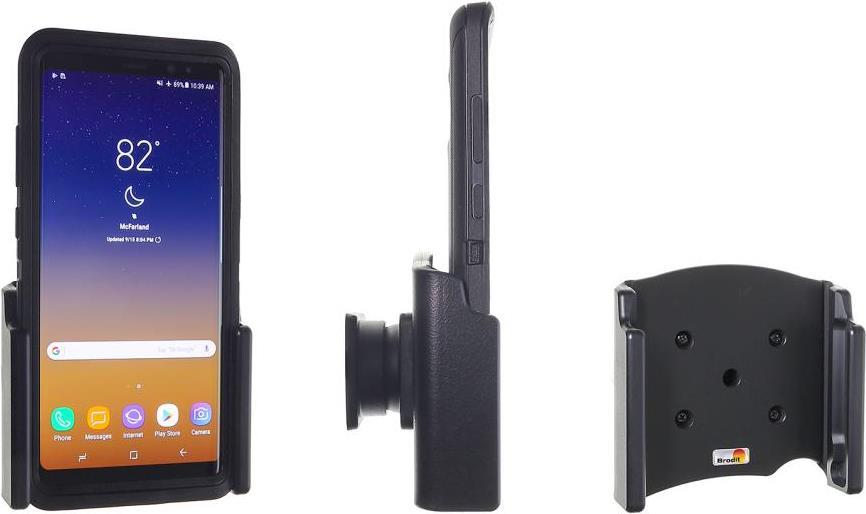
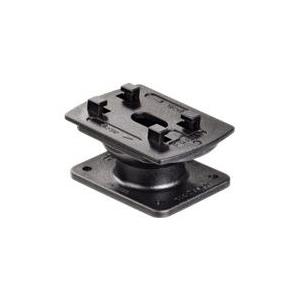
Beschreibung Mit diesem aktiven Gerätehalter von Brodit können Sie Ihr Smartphone sicher im Fahrzeug platzieren. Durch das Kugelgelenk können Sie den Halter auf Ihren idealen Blickwinkel anpassen und während der Fahrt Ihr Smartphone aufladen. Highlights Aktiver Halter inkl. Kugelgelenk Flexibel einstellbare Breite von 59 - 63 mm Geeignet für eine Gerätetiefe von 6 - 10 mm Inkl. USB Kabel mit Lightning Connector Inkl. Zig-Stecker mit USB Anschluss Die Halterung ist weich beflockt für einen besseren Schutz Der Halter ist mit jedem Brodit ProClip kombinierbar Passend für das Apple iPhone 5 mit Schutzhülle Technische Daten Hersteller Brodit Herstellernr. 521503 EAN 7320285215030 Produktart Aktiv-Halter Produktfarbe schwarz Passend für Apple iPhone 5 mit Schutzhülle Maße Breite: 59 - 63 mm Dicke: 6 - 10 mm Lieferumfang Bedienungsanleitung (de) Halter KFZ-Ladekabel Kugelgelenk Anleitung Spannung 12 Volt
Color:Negro; Dimensiones (cm):432cm; Marca:Saad,Kia,Saab,Acura,Eagle,Skoda,Lexus,Saturn,Alfa,Ford,Passat,Mazda,Scion,Audi,Geo,Peugeot,Opel,Mercedes-Benz,Subaru,BMW,GMC,Indigo,Fiat,Mercury,Suzuki,Buick,Honda,MINI,Mitsubishi,Proton,Cadillac,Toyota,Alpina,Hyundai,Nissan,Land Rover,Chevrole,Volkswagen,Bentley,Infiniti,Oldsmobile,Citroen,Chevrolet,Volvo,Mega,Isuzu,Plymouth,Renault,Chrysler,Isdera,Jaguar,Pontiac,Lincoln,Daewoo,Seat,Jeep,Porsche,Aston Martin,Dodge; Tipo:Bluetooth Coche Kit; Conexión:Bluetooth; Audio:Altavoz; Rango de Distancia:about 10mtr
Kurzinfo: Kensington Charge & Sync Cable - iPad-/iPhone-/iPod-Lade-/Datenkabel - USB - USB (M) - bis - Apple Dock-Stecker (M) - 20 cm (Packung von 5) - für Apple iPad (3rd generation), iPad 1, 2, iPhone 3G, 3GS, 4, 4S, iPod (4G, 5G), iPod classic, iPod mini, iPod nano (1G, 2G, 3G, 4G, 5G, 6G), iPod touch (1G, 2G, 3G, 4G) Gruppe Kabel Hersteller Kensington Hersteller Art. Nr. K67865WW EAN/UPC Produktbeschreibung: Kensington Charge & Sync Cable - iPad-/iPhone-/iPod-Lade-/Datenkabel - USB - 20 cm Kabel iPad-/iPhone-/iPod-Lade-/Datenkabel - USB Paketierte Menge 5 (Spezifikationen gelten für einen Artikel) Länge 20 cm Linke Anschlussstellen 1 x 4-polig USB Typ A - männlich Rechte Anschlussstellen 1 x Apple Dock-Stecker - männlich Zusätzliche Merkmale Synchronisieren und Laden Entwickelt für Apple iPad (3. Generation), iPad 1, 2, iPhone 3G, 3GS, 4, iPod (4G, 5G), iPod classic, iPod mini, iPod nano (1G, 2G, 3G, 4G, 5G, 6G), iPod touch (1G, 2G, 3G, 4G) Ausführliche Details Allgemein Paketierte
Operation Specifications:1. Press and hold the power button for 1S to turn on the machine. At this time, the white indicator of the device 1status and the white status indicator of the device 2 are on, and the middle power indicator is lit yellow.2. At this time, put the bluetooth device (bluetooth speaker or earphone) into the bluetooth pairing state, and thenpress the right button of MR275 right. At this time, the blue indicator of the device 2 status flashes quickly and entersthe search pairing state. After the pairing is successful, the device 2 is blue. The status indicator will be steady on.3. If you need to connect a buetooth device (bluetooth speaker or earphone), enter another bluetooth device (bluetoothspeaker or earphone) into the bluetooth pairing state, and then press the MR275 left pairing button. At this time, the device1 status blue indicator light is fast. Flash, enter the active search pairing state, after the pairing is successful, the blue statusindicator of the device 1 will be always on.4. Press and hold the right pairing button for 5 seconds to enter the bluetooth clearing list (that is, all previously connectedbluetooth device lists will be deleted).5. Automatic connection status:When the bluetooth device and the MR275 are successfully paired, when the bluetooth device is turned on again, it willautomatically connect back to the MR275;When the bluetooth device is turned on and waiting for the connection state, the MR275 is turned on at this time, and t